
Understanding the Historical Context
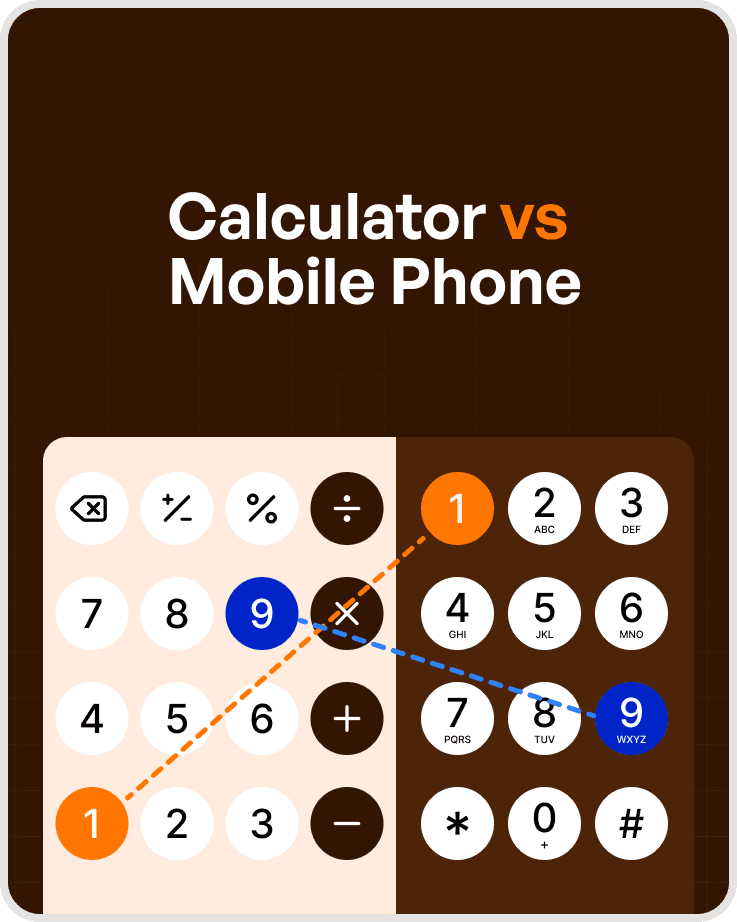
Calculators existed before modern telephones.
Their keypad layout was optimized for numerical data entry by accountants and clerks who frequently worked with adding machines. Placing lower numbers at the bottom aligned better with arithmetic workflows and hand movement during repetitive calculations.
When touch-tone dialing was introduced in the 1960s by Bell Labs, designers had to decide whether to reuse this familiar calculator layout or rethink it entirely.
They chose a different arrangement.
The Role of Usability Studies at Bell Labs
Bell Labs conducted extensive usability testing before finalizing the phone keypad.
Multiple keypad layouts were tested to evaluate:
Speed of use
Error rates
User comfort
Cognitive load
Although some layouts appeared uncomfortable or unintuitive at first glance, each option was evaluated objectively to determine the most reliable solution.
Key Findings From the Research
The usability studies revealed some unexpected results:
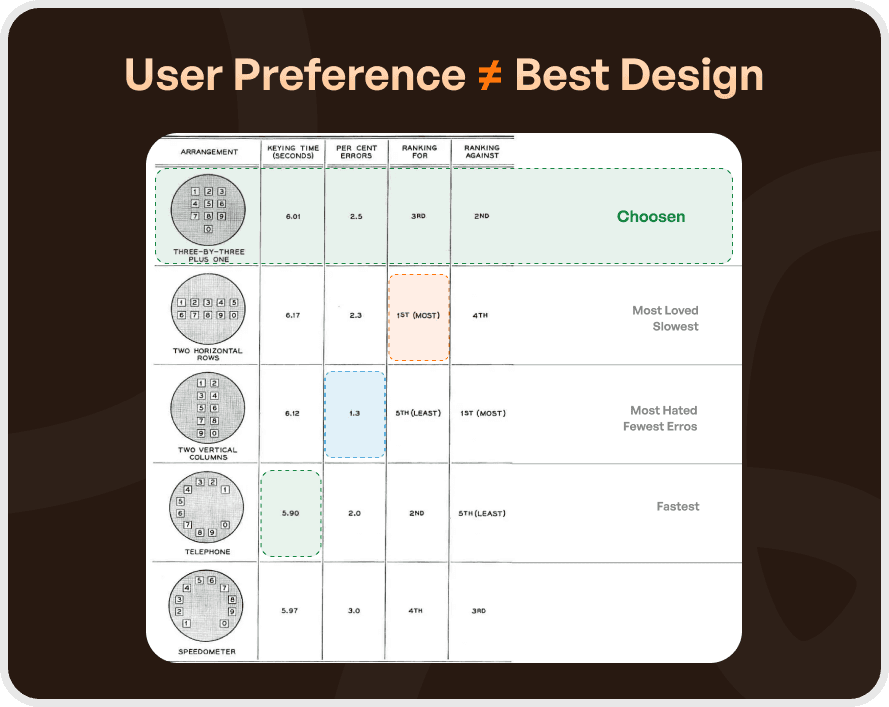
The rotary-style layout was the fastest for users already familiar with it
Two vertical columns had the lowest error rate (1.3%), despite being disliked
Two horizontal rows were the slowest and ranked lowest
User preference often conflicted with accuracy
This highlighted a critical UX insight:
”what users like is not always what performs best.”
How the Final Phone Keypad Layout Was Chosen
Bell Labs did not choose the fastest or most accurate layout.
Instead, they selected the three-by-three grid with one row below, and here’s why:
English reading patterns flow left-to-right and top-to-bottom
55% of users felt this layout was the most “logical”
Numbers were easier to scan visually in a top-down order
The structure aligned better once letters were added to keys
Engineering constraints and system logic also supported this layout, making it scalable across phones, ATMs, and card machines.
Why Calculators Kept Their Original Layout
Although the phone keypad was tested for calculators as well, it failed in that context.
Calculators are used primarily for arithmetic operations, where:
Calculations often start with lower digits (1, 2, 3)
Zero is used frequently and benefits from being closer to hand
Repetitive numeric input favors speed over visual scanning
As a result, calculators retained their original, inverted layout because it better supported task efficiency and muscle memory.
The UX Insight Behind Both Designs
Most users never consciously notice this difference and that’s the point.
Over time, muscle memory takes over. The design disappears, and the interaction feels natural. This is the hallmark of intuitive UX.
However, forcing users to learn or re-learn patterns increases cognitive load, slows performance, and harms experience especially in critical or repetitive tasks.
Conclusion
The difference between phone and calculator keypads is not a flaw it’s intentional design.
Each layout was optimised for:
Context of use
Task type
Error tolerance
Human behavior patterns
Good design doesn’t aim to be noticed.
Great design becomes invisible.
As we believe:
“Good design is obvious. Great design is transparent.”
Key UX Takeaways for Product Teams
1. User Preference Isn’t Everything:
Users preferred layouts that were slower or more error-prone. Observation matters more than opinion.
2. Accuracy vs Comfort Is a Trade-off:
The most accurate layout was also the most disliked. Emotional response still matters.
3. Optimisation Beats Perfection:
The chosen layout wasn’t the best at one thing but it balanced all constraints effectively.
4. Context Defines Design:
A solution that works for phones failed for calculators. Context changes everything.
5. Holistic Design Wins:
The best outcomes balance usability, task needs, engineering limits, and human behavior.




